
Drywall software
Drywall software that schedules around dry time and bills for every board.
Estimate hang and finish by the board or square foot with the finish level spelled out, schedule tape and coat trips around dry time, price the extra closet before it's hung, and bill builders against their POs.
We're onboarding early customers — join the waitlist or book a demo.
Why Homeforce
Built around how drywall businesses actually work.
The problems drywall owners run into most — and how Homeforce handles each one.
- 01
Problem: Quotes say "hang and finish" and the customer expected a Level 5 wall.
With Homeforce: Options spell out board type, finish level, and texture, so the homeowner picks the finish they're paying for.
- 02
Problem: Coats need a day to dry, so a three-day job turns into six trips the schedule doesn't show.
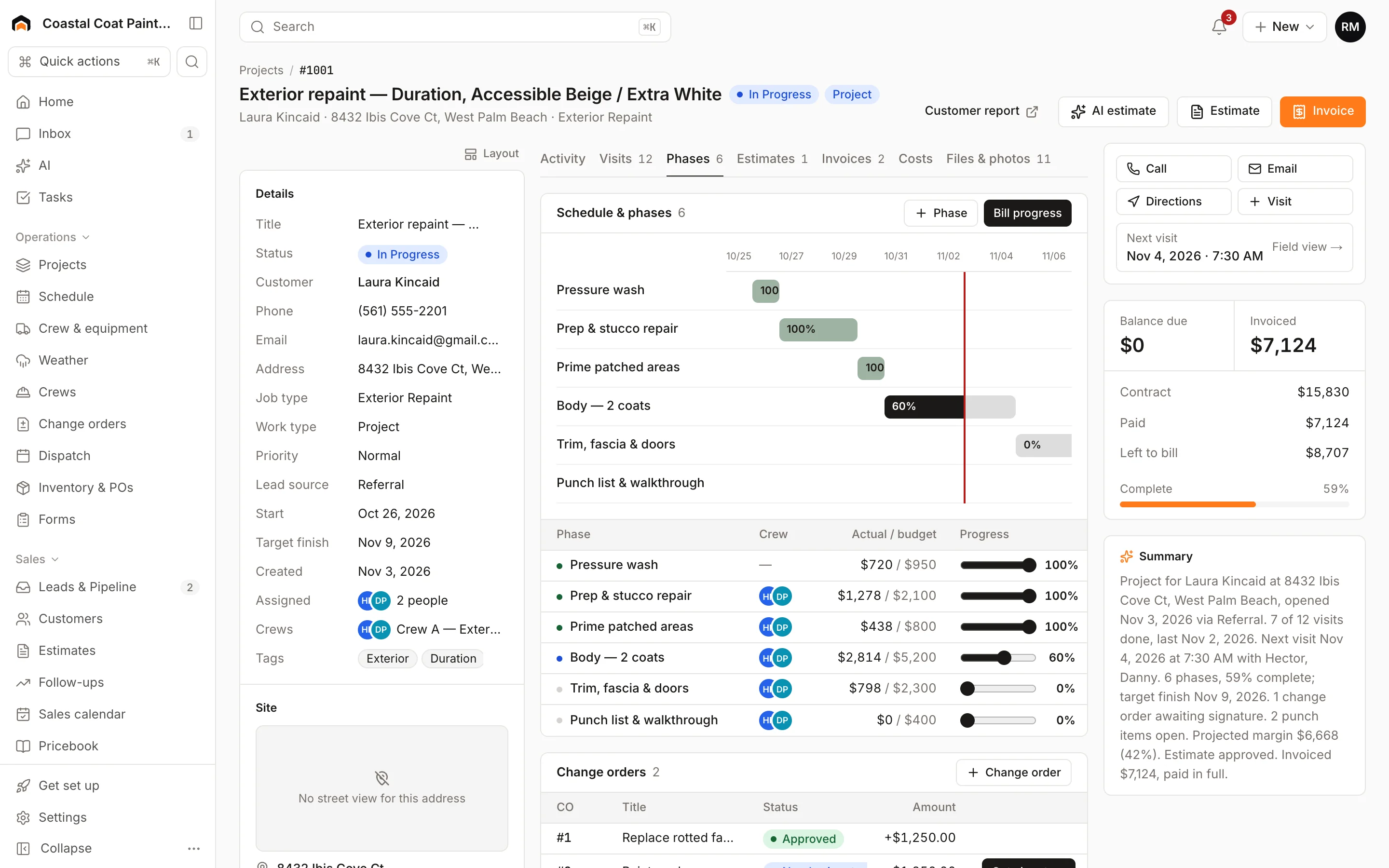
With Homeforce: Run larger jobs as projects with hang, tape, coat, and sand phases, and book each return trip as its own crew visit.
- 03
Problem: "While you're here, can you do the garage?" never gets billed.
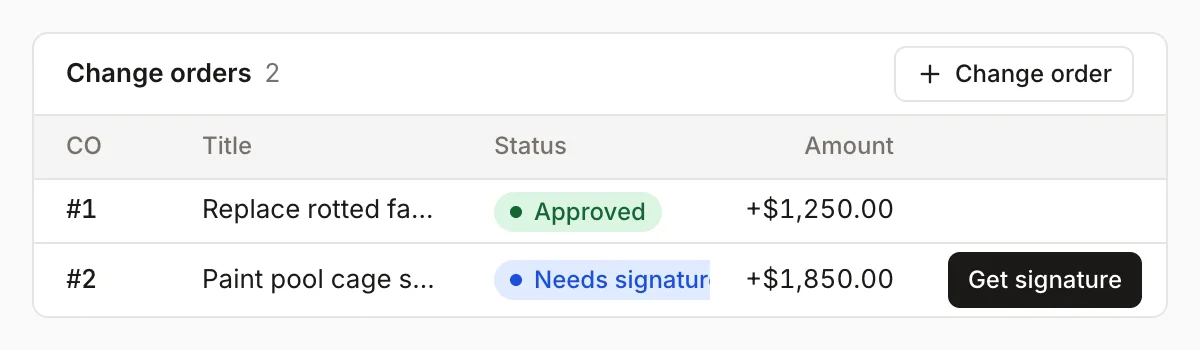
With Homeforce: Price it as a change order and get the homeowner's signature on your screen before the board goes up.
- 04
Problem: Builders pay against POs and hold retainage, and you lose track of what's left.
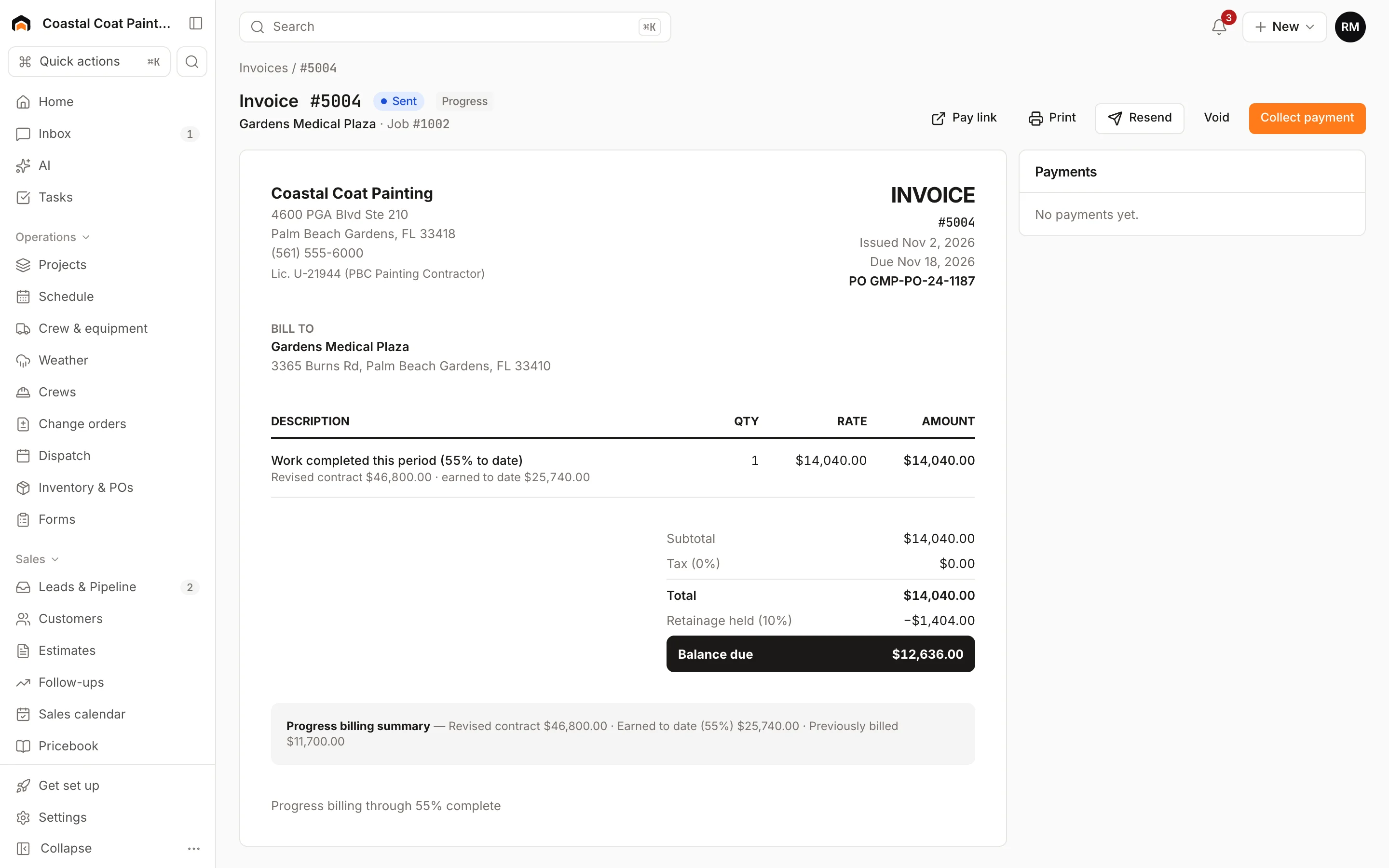
With Homeforce: Put the builder's PO number on the job and invoice, and progress invoices track retainage held.
How it works
A day in a drywall business, on Homeforce.
New construction, basement finishes, remodel walls, and patch-and-match service calls — each one scheduled and billed the way drywall actually gets done.
Board & finish
Quote the finish, not just the footage.
Build line items by room from your pricebook: board count by type, square footage for finishing, corner bead, and texture. Offer options by finish level so the homeowner sees the difference between a Level 4 wall and a Level 5 skim before they sign.
Hang to sand
A schedule that knows mud needs to dry.
Lay the job out in phases: deliver and hang, tape, second and third coats, sand and prime. Book crew days per phase from the crew board, leave the dry days open for another job, and the homeowner sees progress on their report.
Scope changes
Price the garage wall before it's hung.
Add the change with a price, your cost, and any extra days, and the homeowner signs on your tablet. Once it's approved, the contract, the cost budget, and the next progress invoice all pick it up.
Service calls
Small patches pay when they're priced right.
Patch-and-match jobs book as service calls with an arrival window. The tech takes before and after photos, builds the invoice from flat-rate pricebook items, and collects before leaving, including the return trip to texture and paint when it's needed.
POs & retainage
Draws that match the builder's paperwork.
Put the builder's PO number on the job and invoices. Bill progress as phases finish, hold the retainage the contract calls for, and watch Retainage held on the Invoices page until the builder releases it.
Built for drywall
The features drywall teams use most.
- Estimates & proposalsGood / better / best options, signed on the spot.Learn more
- Projects & job costingMulti-week jobs scheduled, tracked, and costed live.Learn more
- Change orders & progress billingApproved scope changes and milestone billing, in order.Learn more
- Dispatch & schedulingOne drag-and-drop board for every tech and job.Learn more
- PricebookFlat-rate pricing every tech quotes the same way.Learn more
- Timesheets & payrollAccurate hours from the field, ready for payroll.Learn more
- Mobile appEverything techs need in the field — even offline.Learn more
- PaymentsCard and ACH by pay link or card reader.Learn more
On site
Hangers and finishers see the same plan.
Crew leads open the day's visit, clock in, and take before, during, and after photos that land on the project under the right phase. When the homeowner asks for another wall, a note goes to the office so the change order is written before the work is done.
- Crew time tracked by project for accurate labor cost
- Photos of every phase, including inspections, on the project timeline
- Punch list for touch-ups before the final walk
Homeforce for drywall, on real screens
Screens from the Homeforce app, taken from our demo companies.
FAQ
Drywall software questions, answered.
Have a question we didn't cover? Book a demo and ask a product specialist.
Can I estimate drywall by the board or by the square foot?
Both. Build pricebook items per sheet by board type and per square foot for finishing, plus bead, texture, and patch items, then group them by room on the estimate. Options let you price different finish levels side by side.
How do I schedule around dry time between coats?
Run the job as a project with phases for hang, tape, each coat, and sanding, and book crew days per phase. Dry days stay open so the crew can work another job.
Does Homeforce help with lead-safe rules on older homes?
If you cut into painted walls in a pre-1978 home, EPA's Renovation, Repair and Painting rule may require a Lead-Safe Certified firm and lead-safe work practices. Homeforce doesn't certify anything, but you can add a pre-1978 checkbox on the property and a required lead-safe checklist on the job type so the crew documents setup and cleaning.
Can I work as a sub for builders and GCs?
Yes. Add the builder's PO number to the job and invoice, bill progress by phase, and hold retainage when the contract calls for it. Retainage held shows on the Invoices page.
Are small patch jobs worth running in Homeforce?
Yes. They book as service calls with an arrival window, techs invoice from flat-rate pricebook items, and the customer pays on site by card or from a pay link.
More for drywall businesses
Run your drywall business on Homeforce.
We're onboarding early customers a few at a time. Join the waitlist, or see it with your own jobs, techs, and pricebook in a 30-minute demo.
Onboarding early customers · Month-to-month · Free data migration