
Homeforce vs DripJobs
Homeforce vs DripJobs
Both tools are built to win estimates: a pipeline, proposals customers sign online, and automatic follow-ups. DripJobs is a sales CRM that painting contractors know well. Homeforce adds a dispatch board, an offline tech app and per-tech pricing with office users included. Here's how they compare, with sources.
Details about DripJobs checked November 3, 2026, with sources below.
DripJobs at a glance
Sales-focused CRM for painting and other estimate-driven home service contractors
DripJobs is a CRM for home service contractors built around a sales pipeline, automated text and email follow-ups (its "drip messages"), branded proposals with e-signatures, and scheduling. It was founded by a painting contractor and says it is trusted by 2,500+ painting and home service contractors across 14+ trades. Painting is its best-known market, with a production-rates estimating add-on built for painters.[2],[5]
Pricing: As of November 2026: Pro $97/month and Advanced $147/month, each with 1 admin user; Growth is custom-priced for 5+ users. Add-ons on Pro and Advanced include DripJobs Chat ($25/month), Production Rates ($99/month) and Job Costing ($49/month); Jobi AI and additional users are priced on request. Month-to-month, no contract, and no free trial.[1]
What DripJobs does well
- Follow-up is the core of the product: 40+ done-for-you drip messages follow up with leads by text and email, and drips can be tied to deal stages.[1],[2],[7]
- Built with painters in mind. The founder ran a painting business, and the Production Rates add-on calculates labor and materials from square footage and substrates (walls, trim, ceilings, doors, cabinets).[1],[5]
- Proposals with package pricing and e-signatures, a customer portal, online card and ACH payments, and a financing feature are included from the Pro plan.[1],[2]
- Simple, published pricing with no contract. Integrations (Stripe, QuickBooks, Google Calendar, Zapier, CompanyCam) are included at no extra cost, though some are only on Advanced.[1],[3]
- iOS and Android apps are included with every plan, with pipeline access, on-site proposals, e-signatures and photo capture.[4]
Worth knowing
- Pro and Advanced include 1 admin user. Additional users are an add-on with pricing on request, and Growth (5+ users) is custom-priced.[1]
- Two-way texting with a dedicated business number is the DripJobs Chat add-on ($25/month) on Pro and Advanced; unlimited texting is included on Growth.[1]
- Change orders, appointment reminders, proposal templates, Google Calendar and Zapier start on the Advanced plan, and job costing is a $49/month add-on.[1]
- There is no free trial, so evaluation happens through a demo.[1]
- The mobile app requires an internet connection to sync in real time; DripJobs does not describe a full offline mode.[4]
Side by side
Homeforce and DripJobs, feature by feature
| Homeforce | DripJobs | |
|---|---|---|
| Pricing model | Flat monthly price by number of field techs: Starter $99 (1–3 techs), Pro $299 (up to 10), Scale $799 (up to 30). Office staff are free. Annual billing saves 20%. | As of November 2026: Pro $97/mo and Advanced $147/mo with 1 admin user each; Growth is custom for 5+ users. Extra users priced on request.[1] |
| Contract and trial | Month-to-month. Early access is by waitlist; onboarded companies get a 14-day free trial. | Month-to-month, no contract. No free trial.[1] |
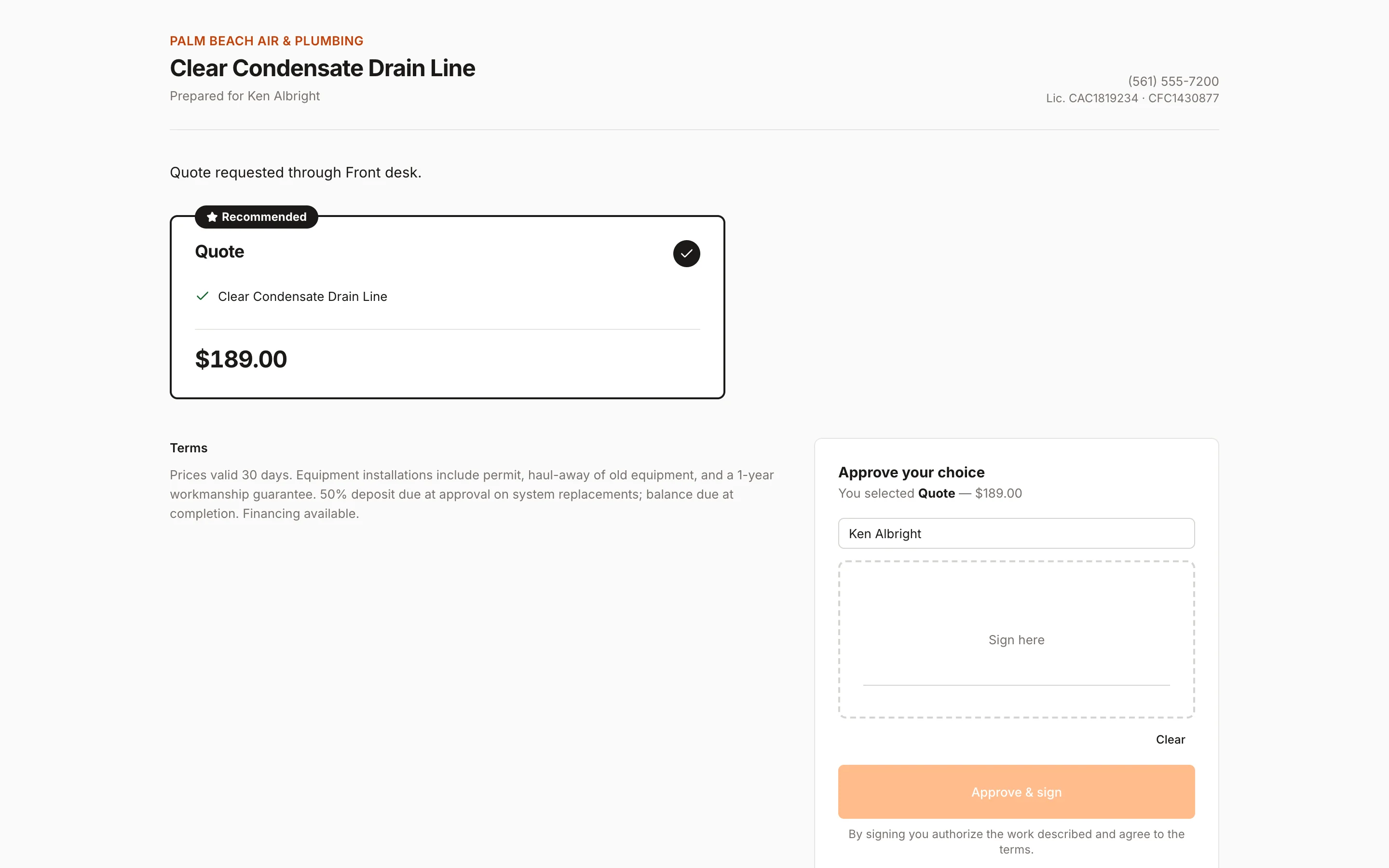
| Estimates and proposals | Estimates with options, discounts and deposits; customers approve and sign from a link or in present mode. Good / better / best options are on Pro and up. | Branded proposals with package pricing and e-signatures on Pro; proposal templates on Advanced; square-footage production rates as a $99/mo add-on.[1],[5] |
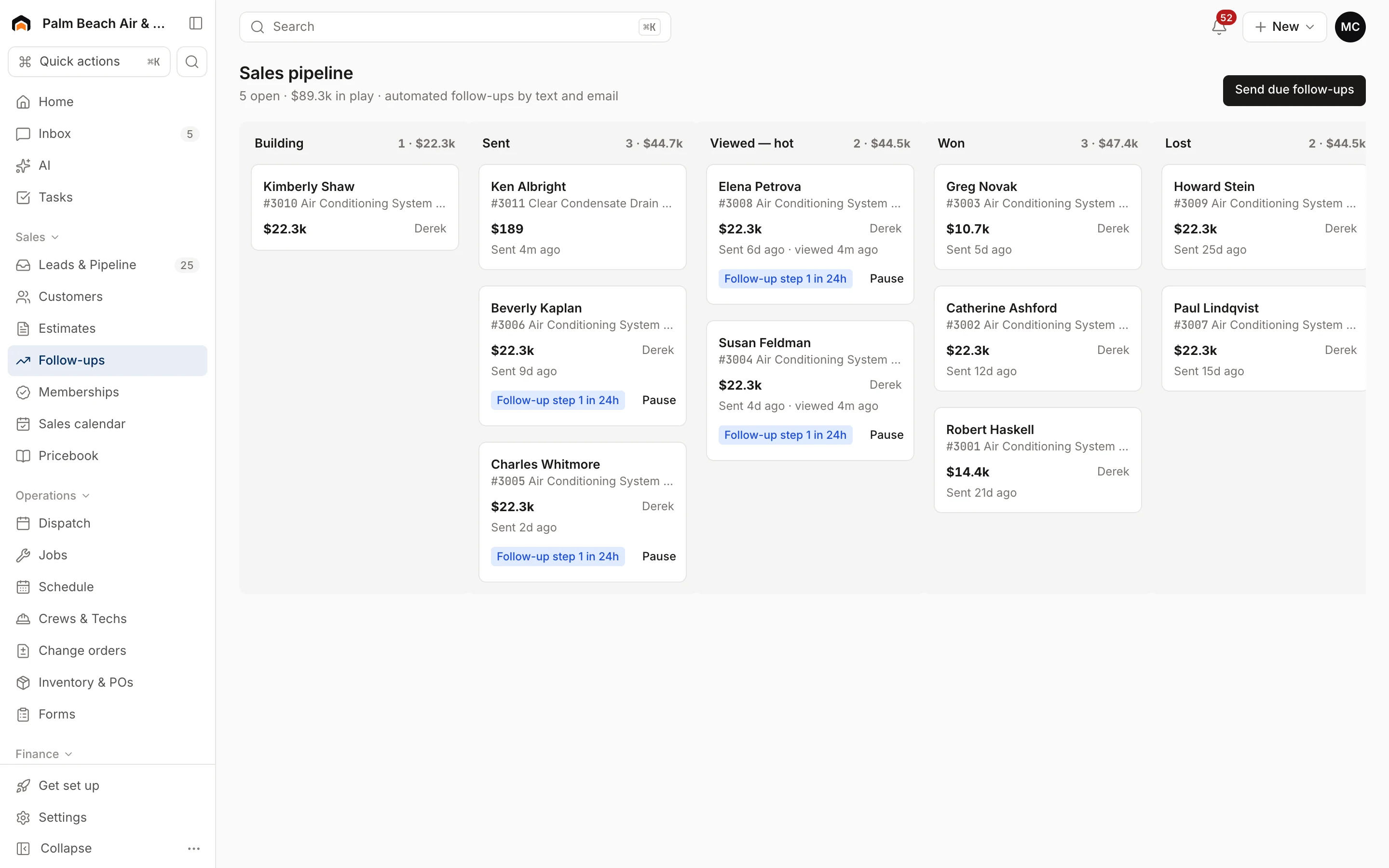
| Follow-ups | Sales pipeline (Building, Sent, Viewed, Won, Lost) with a default 4-step text and email follow-up sequence that stops on approval. Texts send through a connected Quo account today. | 40+ done-for-you drip messages by text and email, tied to deal stages. Two-way texting is the $25/mo Chat add-on on Pro and Advanced.[1],[2],[7] |
| After the sale | Approval locks the estimate, records the signature and creates any deposit invoice. You create the job yourself; it isn't automatic. | Separate pipelines for deals and jobs, with two calendars for estimates and jobs.[2],[7] |
| Recurring work | Memberships with up to 12 included visits a year, created as unscheduled jobs 21 days before they're due (Pro and up). | Not published on the pages we checked.[1],[2] |
| Scheduling and dispatch | Drag-and-drop dispatch board with tech rows, an unscheduled queue, map and capacity views. Route optimization on Pro and up. | Job and appointment scheduler with separate estimate and job calendars; crew dispatching from the platform.[1],[2] |
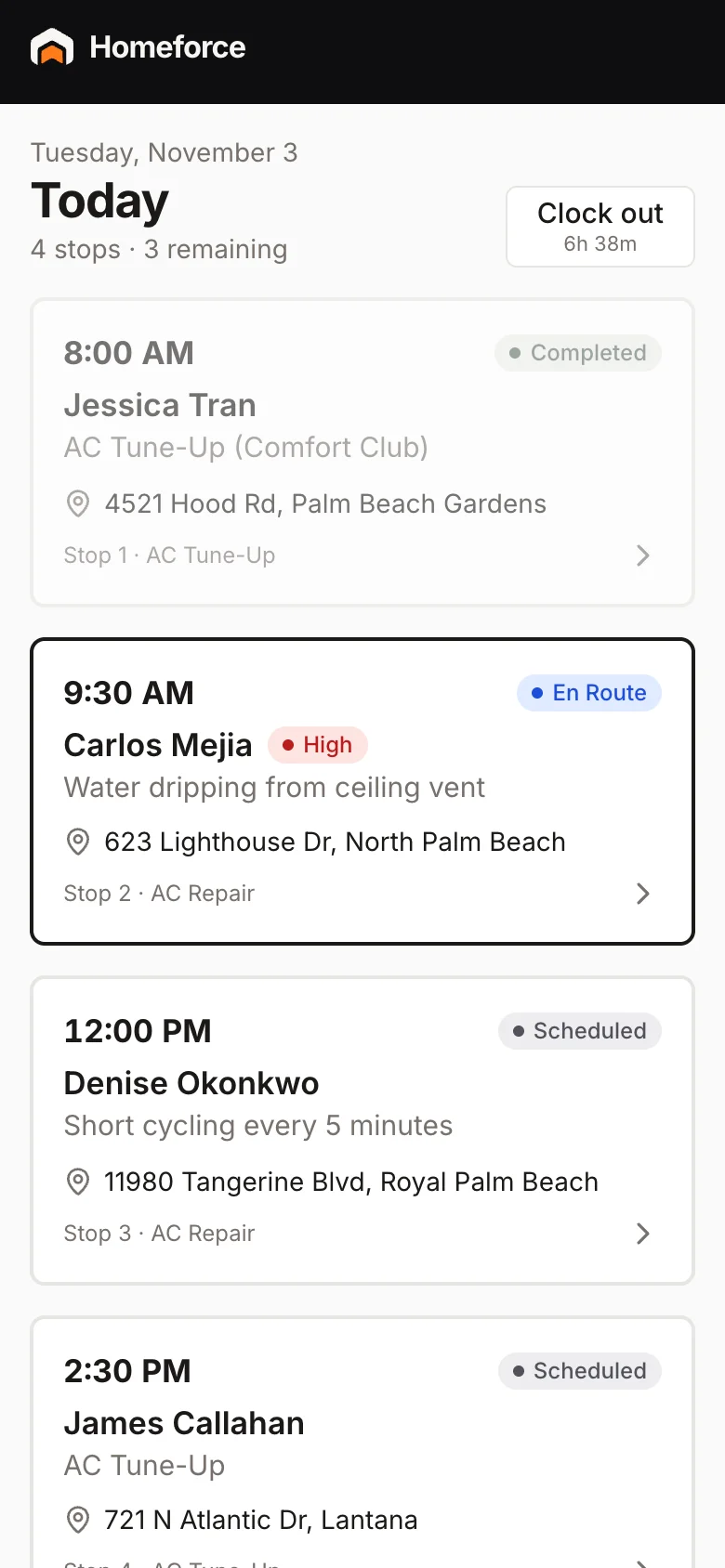
| Mobile and offline | iPhone and Android app. Stores a tech's visits and pricebook on the phone; checklists, photos, signatures, estimates and invoices work with no signal and sync later. | iOS and Android app included with every plan. DripJobs says it requires an internet connection to sync in real time.[4] |
| Payments and financing | Card and ACH through Stripe, deposits on approval, card readers (2.7% + 5¢ in person), and consumer financing on every plan. | Online card and ACH payments through Stripe, deposits on proposal acceptance, and a financing feature on Pro.[1],[3] |
| Integrations | Available today: Quo, Google Calendar, website forms and chat, webhooks and API. QuickBooks Online, Zapier and Homeforce texting numbers are coming soon. | Stripe, QuickBooks, Google Calendar, Zapier and CompanyCam included at no extra cost (Google Calendar and Zapier on Advanced).[1],[3] |
| Reporting | Reports for revenue collected, invoicing, average ticket, close rate and team performance over 7 to 90 days; lead source ROI on Pro. | Reporting is listed as a feature; details aren't published on the pages we checked.[2] |
| AI | AI estimate drafts and AI-written follow-ups (Pro), voice-to-notes for techs. The AI receptionist runs only in an in-app simulator today. | Jobi AI drafts follow-up texts and emails and scores deals. Priced on request.[1],[6] |
Fit
Where Homeforce fits better
You're adding techs and office help
Homeforce prices by field tech, and office staff, managers and CSRs don't add seats. Starter covers up to 3 techs for $99 a month.
Your crews work where signal drops
The Homeforce app keeps a week of visits and your pricebook on the phone. Techs can complete checklists, take photos, get signatures and build estimates offline, and it syncs when they reconnect.
You run service work alongside painting jobs
A dispatch board with an unscheduled queue, capacity view and route optimization handles same-week service calls next to longer jobs. Memberships cover annual touch-up or inspection plans.
You want follow-up without a separate tool
Sending an estimate starts a default follow-up sequence, and the pipeline flags customers who opened the link. On Pro, AI drafts a personal follow-up you can edit before sending.
Who should stay with DripJobs
Stay on DripJobs if your business is mainly painting sales and its tools are already doing the work: production-rate estimating by square footage and substrate is purpose-built for painters, the drip library is large and ready to use, and QuickBooks and Zapier connect today, where they're still coming soon in Homeforce. DripJobs also moves sold deals into a jobs pipeline, while in Homeforce you create the job yourself after approval. And if texting your leads from a built-in business number matters right now, note that Homeforce texting currently runs through a connected Quo account.
What Homeforce looks like
Real screens from the Homeforce app, from our demo HVAC and painting companies.
Switching from DripJobs
Export customers, estimates, jobs and invoices from DripJobs as CSV. Homeforce's importer recognizes DripJobs exports, so you map columns and preview before anything is saved; import customers first so the rest can be matched to them. Homeforce also offers free data migration. Rebuild your follow-up wording in Settings → Estimates & proposals, and plan to keep DripJobs open until open proposals are signed or lost.
FAQ
Homeforce vs DripJobs: common questions
Have a question we didn't cover? Book a demo and ask a product specialist.
Does Homeforce have drip follow-ups like DripJobs?
Yes, for estimates. Sending an estimate starts a default sequence: a text on day 1, an email on day 3, a text on day 7 and a last text on day 14. It stops when the customer approves or declines. You can pause it per estimate and edit sequences in settings. DripJobs ships a larger library of 40+ prewritten drips across deal stages.
Can I send texts from Homeforce today?
Yes, through a connected Quo (OpenPhone) account, which can send reminders, on-my-way texts, follow-ups and inbox replies. Homeforce's own texting numbers are coming soon. Until one of these is set up, texts are held and email still goes out.
Can Homeforce estimate paint jobs by square footage?
Not with a built-in production-rate calculator like DripJobs' add-on. In Homeforce you build options from pricebook items with quantities, and on Pro, AI can draft good / better / best options from your notes.
How do user costs compare for a 4-person painting crew with an office manager?
In Homeforce, the 4 field techs fit the Pro plan ($299 a month, up to 10 techs) and the office manager is free. DripJobs' Pro and Advanced plans include 1 admin user, and additional users are priced on request (as of November 2026).
Will my sold DripJobs proposals become jobs automatically in Homeforce?
No. When a customer approves a Homeforce estimate, it's marked sold, the signature is saved and any deposit invoice is created. You then create the job or book the appointment. Start the estimate from a job if you want the two linked.
Is there a free trial of either product?
DripJobs says it doesn't offer a free trial. Homeforce is onboarding early customers from a waitlist, and each one gets a 14-day free trial when they're brought on.
Sources
Competitor details come from each company's public website and listings on the dates shown. Products change; check the vendor's site for current details. Spot something out of date? Email hello@tryhomeforce.com.
- [1] DripJobs pricing page · checked November 3, 2026
- [2] DripJobs homepage · checked November 3, 2026
- [3] DripJobs integrations page · checked November 3, 2026
- [4] DripJobs mobile app page · checked November 3, 2026
- [5] DripJobs painting CRM page · checked November 3, 2026
- [6] DripJobs help: Jobi AI · checked November 3, 2026
- [7] DripJobs on the App Store · checked November 3, 2026
- [8] PaintScout pricing page · checked November 3, 2026
- [9] Jobber pricing page · checked November 3, 2026
- [10] Housecall Pro pricing page · checked November 3, 2026
- [11] Housecall Pro homepage · checked November 3, 2026
Keep exploring
Features compared
Industries
More comparisons
Run your whole business on Homeforce.
We're onboarding early customers a few at a time. Join the waitlist, or see it with your own jobs, techs, and pricebook in a 30-minute demo.
Onboarding early customers · Month-to-month · Free data migration