
Homeforce vs ServiceTitan
Homeforce vs ServiceTitan
ServiceTitan is the most complete platform in the trades, built for large residential and commercial contractors and backed by implementation teams and a deep AI roadmap. Homeforce is a newer, early-access option with published prices and month-to-month terms, aimed at shops that want memberships, options and project tools without a long commitment. ServiceTitan details below are from its own site and SEC filings, checked November 2026.
Details about ServiceTitan checked November 3, 2026, with sources below.
ServiceTitan at a glance
Enterprise-grade field service and construction software for residential and commercial contractors
ServiceTitan is a publicly traded software company whose platform covers call booking, dispatch, pricebook, payroll, commissions, memberships and reporting, with optional Pro products for marketing, contact centers, fleet and more. It also offers construction tools such as project tracking, progress billing and WIP reporting, and in 2026 it expanded its AI package, Max, and its Atlas assistant.[1],[2],[4],[6]
Pricing: Quote-based. As of November 2026, ServiceTitan's pricing page lists three packages (Starter, Essentials and The Works) with "Request Pricing" and describes per-technician pricing. Pro products such as Marketing Pro, Pricebook Pro, Dispatch Pro and the AI Virtual Agent are listed separately. Its annual report says new customers mainly sign annual or multi-year agreements.[1],[2]
What ServiceTitan does well
- Breadth: dispatching, call booking, pricebook, mobile estimates, payroll, commission tracking, customizable memberships and advanced reporting are all part of the packages.[1]
- Deep construction tooling: progress billing aligned with AIA guidelines, WIP reporting, purchasing and inventory, plus daily logs, RFIs and change orders announced in 2025.[5],[6]
- A detailed offline model in the Field Mobile App: status updates, time tracking, notes, signatures, photos, most estimate and form work, and keyed-in card, check, ACH and cash payments work without a connection.[3]
- Heavy AI investment: Atlas launched as an agentic layer across the platform, and in October 2026 the Max AI package opened to all residential in-home contractors.[4],[5]
- Dedicated implementation and professional services teams help each customer with onboarding and configuration.[2]
Worth knowing
- Prices aren't published. All three packages require a pricing request, and pricing is partly based on the number of technicians.[1],[2]
- Longer commitments: ServiceTitan's FY2026 annual report says new customers primarily sign annual or multi-year agreements (typically 12 to 36 months) and that nearly all contracts renew automatically unless cancelled in advance.[2]
- Many capabilities are separate Pro products, including Marketing Pro, Contact Center Pro, Pricebook Pro, Fleet Pro, Scheduling Pro, Dispatch Pro and the AI Virtual Agent.[1]
- Its annual report notes customers may need to dedicate resources to implementation, onboarding and training to get the full benefit of the platform.[2]
- Some mobile tasks need a connection: purchase orders, inventory availability, customer financing, contracts and viewing upgrade options on estimates.[3]
Side by side
Homeforce and ServiceTitan, feature by feature
| Homeforce | ServiceTitan | |
|---|---|---|
| Pricing model | Published: Starter $99/mo (1–3 techs), Pro $299/mo (up to 10), Scale $799/mo (up to 30, +$25/tech beyond). Enterprise is quoted. | Quote-based. Starter, Essentials and The Works with "Request Pricing"; pricing is partly per technician (as of November 2026).[1],[2] |
| Contract | Month-to-month; optional annual billing saves 20%. | New customers mainly on annual or multi-year agreements, typically 12–36 months, that auto-renew unless cancelled in advance.[2] |
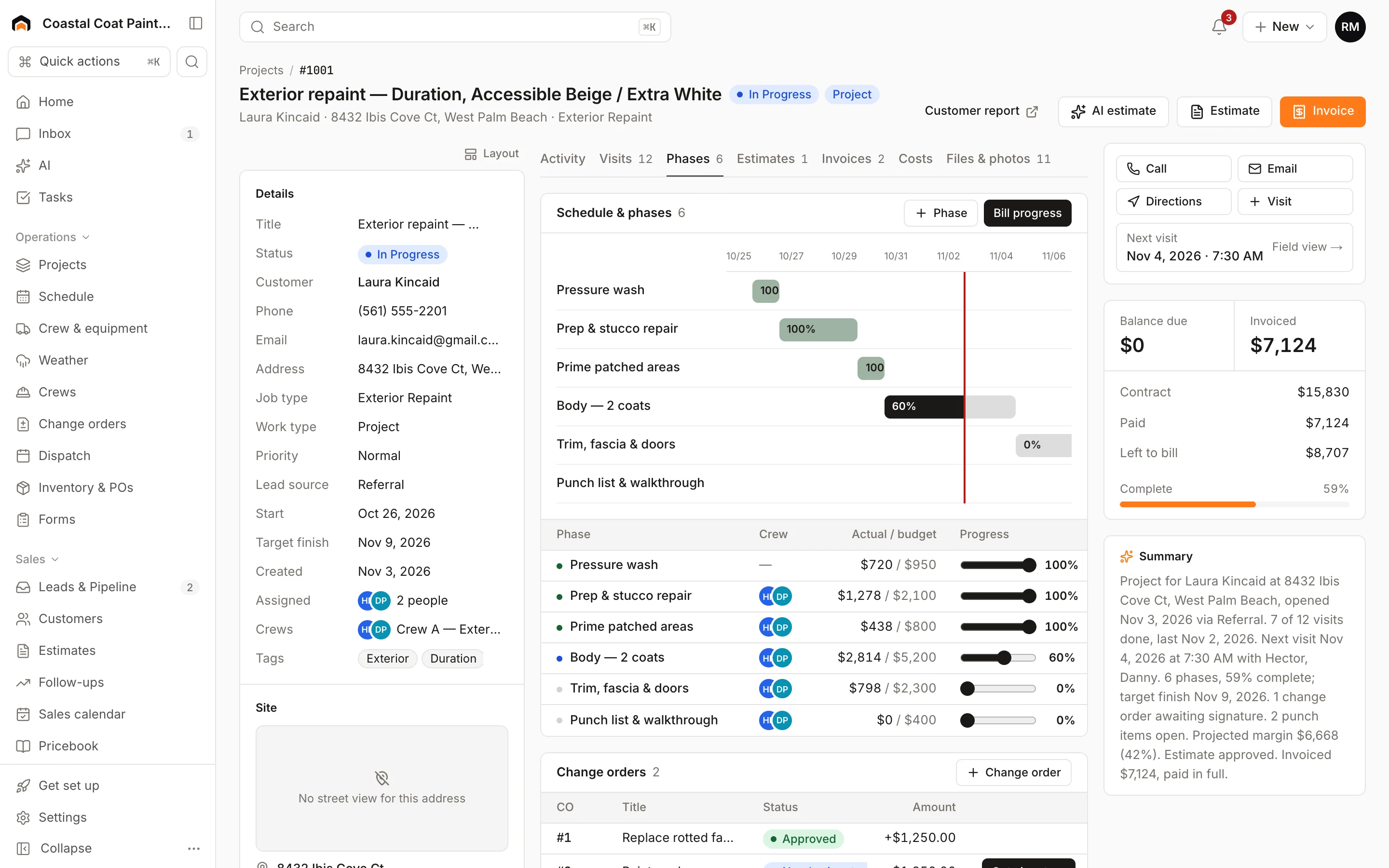
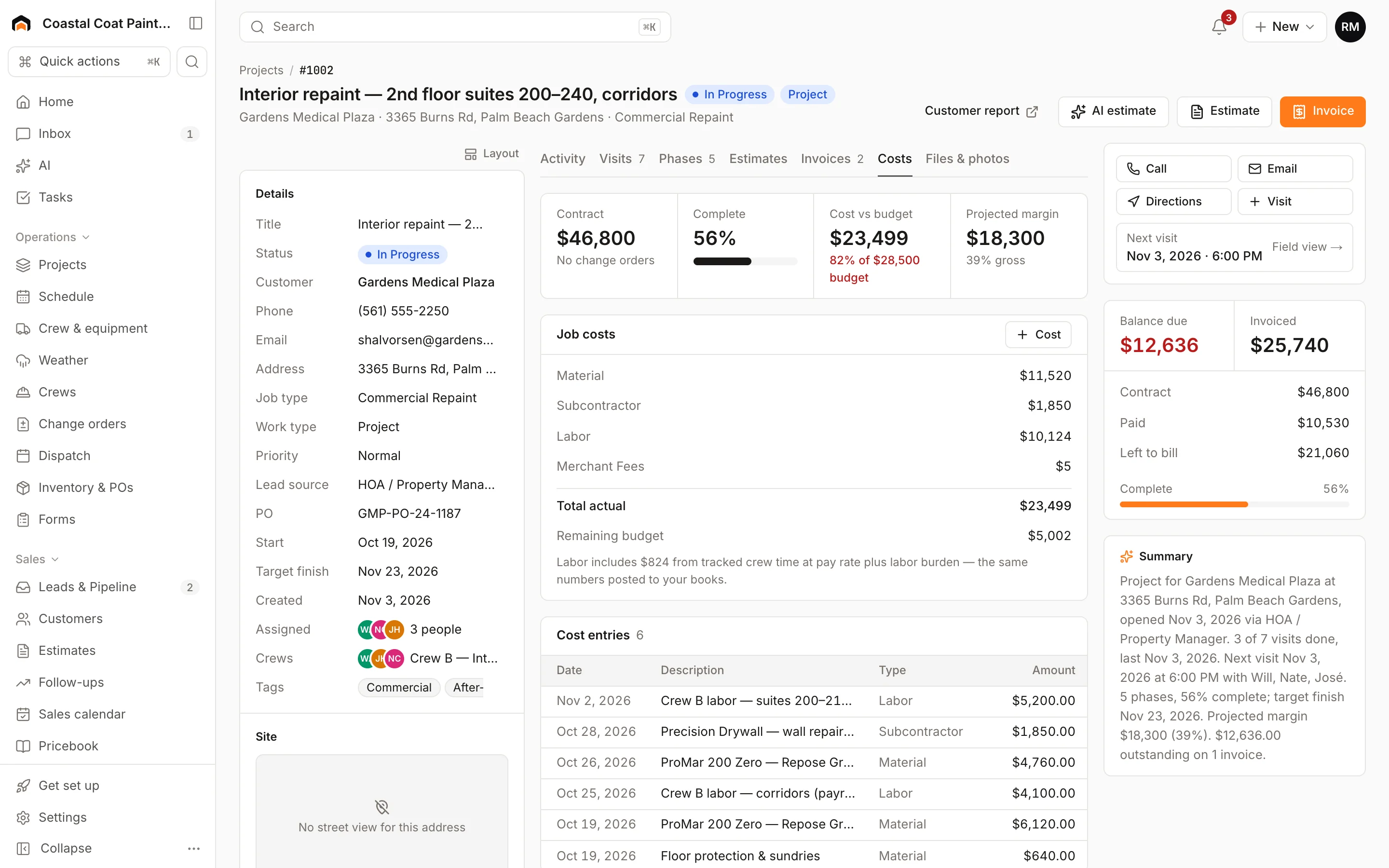
| Service vs project work | Service jobs plus projects on Scale: phases on a Gantt view, change orders signed in person, progress billing, daily logs and budget vs actual. | Service plus construction: project tracking, AIA-style progress billing, WIP reporting, job costing, daily logs, RFIs and change orders.[5],[6] |
| Estimates and options | Good/better/best options with a recommended pick, present mode, deposits and financing estimates. Approving doesn't create a job automatically. | Mobile estimates in every package; Pricebook Pro and Field Pro (formerly Sales Pro) are separate Pro products.[1] |
| Memberships | Membership plans on Pro and Scale with recurring billing, included visits and a repair discount. | Customizable memberships listed in the packages.[1] |
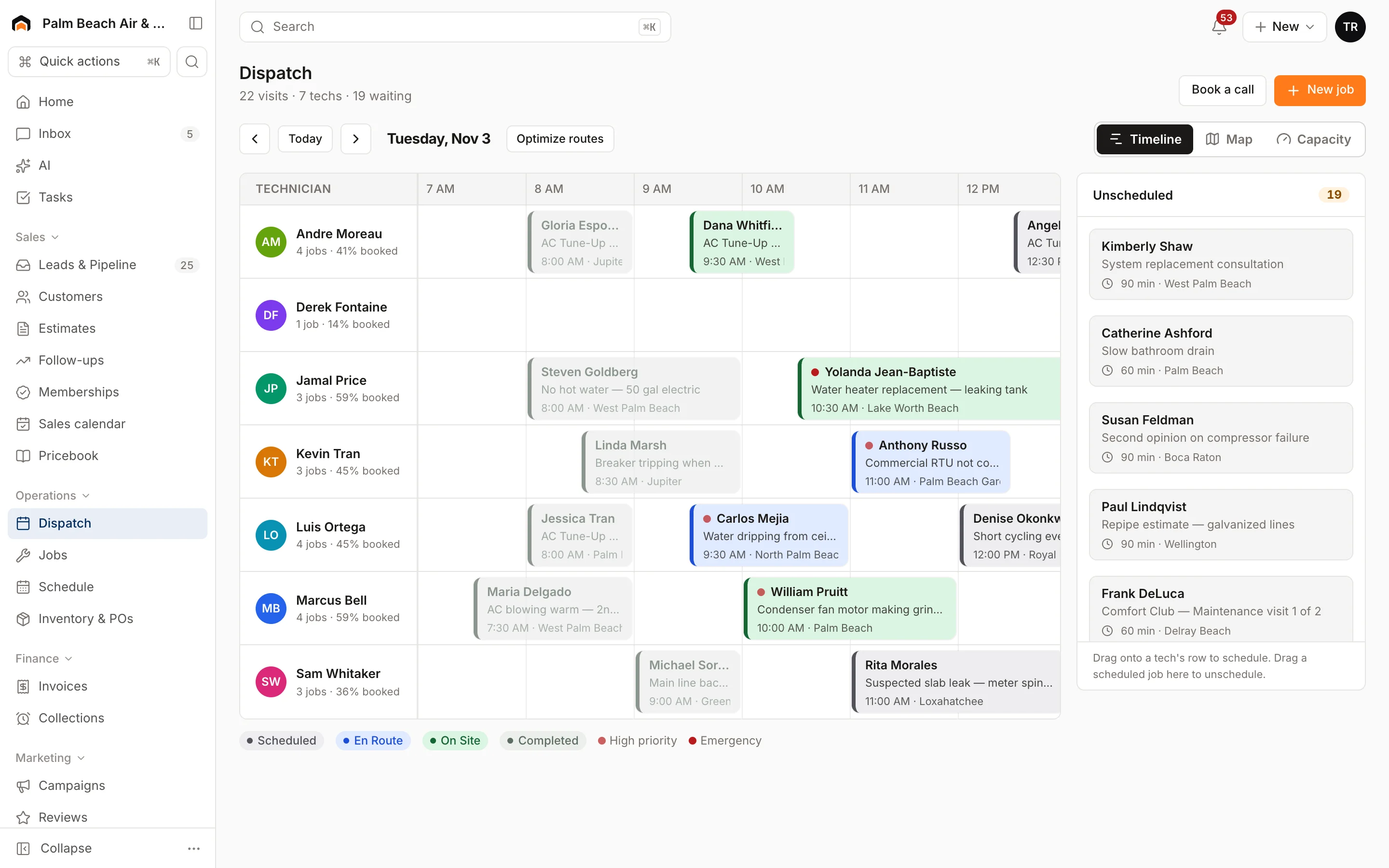
| Dispatch | Dispatch board with timeline, map and capacity views, Optimize routes and AI Suggest. | Dispatching and scheduling in every package; Dispatch Pro and Scheduling Pro sold as Pro products.[1] |
| Mobile and offline | Visits from yesterday through the next six days are stored on the phone; visit work, estimates and invoices sync when you reconnect. Card payments need signal. | Most core workflows work offline; keyed-in card, check, ACH and cash payments queue offline. Card swipe, Tap to Pay, purchase orders and financing need a connection.[3] |
| Payments | Stripe built in; card reader at 2.7% + 5¢; deposits, pay links and consumer-financing prequalification. | Financial stack with Tap to Pay, Pay by Bank, tip collection, embedded financing and AP automation (announced 2025). Rates: Not published.[5] |
| Integrations | Available now: Quo (OpenPhone), Google Calendar, website forms and chat, webhooks and a public API. QuickBooks Online and Zapier are coming soon. | Accounting sync with QuickBooks, Intacct and Viewpoint Vista listed on its construction page.[6] |
| Reporting | Revenue, invoiced, average ticket, close rate, team performance, lead-source ROI and project job costing. | Advanced reporting in the packages; custom reports, dashboards and WIP reporting.[1],[6] |
| AI | AI drafts estimates and follow-ups, suggests techs and answers questions about your numbers; nothing is sent without a person clicking. The AI receptionist is simulator-only for now. | Atlas assistant and mobile app, the Max AI package for residential contractors, and an AI Virtual Agent Pro product.[1],[4] |
Fit
Where Homeforce fits better
You want to see the price before the demo
Homeforce publishes every plan price, from $99/mo for up to three techs to $799/mo for up to 30. You can model your cost on the pricing page before talking to anyone.
You'd rather not sign a multi-year term
Homeforce plans are month-to-month, with annual billing as an optional 20% saving. There's no setup fee.
You're a 5–30 tech shop that wants memberships and projects
Pro covers memberships, good/better/best estimates and route optimization; Scale adds projects with change orders and progress billing, inventory and commissions. That covers a lot of what mid-size residential shops use without separate add-on products.
You want to run it yourselves
Homeforce is built to be set up by the owner or office manager: CSV imports for customers, history and your pricebook, and a step-by-step help center.
Who should stay with ServiceTitan
Stay with ServiceTitan if you run a large or multi-location operation, do serious commercial or construction work that needs AIA-style billing, RFIs and WIP reporting, or rely on its Pro products, contact-center tooling and AI agents. Its integrations with accounting systems like QuickBooks, Intacct and Viewpoint Vista are live today, while Homeforce's QuickBooks sync is still coming soon. And if you're mid-way through a multi-year agreement, check your renewal date before planning a move.
What Homeforce looks like
Real screens from the Homeforce app, from our demo HVAC and painting companies.
Switching from ServiceTitan
Homeforce's importer recognizes ServiceTitan CSV exports. Import customers first, then contacts, properties, equipment, estimates, jobs and invoices, mapping columns and reviewing a preview each time. Re-running a corrected file updates existing records rather than duplicating them. Bring your pricebook in through the pricebook CSV import (it supports member prices, markup and hours), and recreate membership plans in Homeforce before enrolling customers. Line up the switch with your ServiceTitan renewal date, since its agreements auto-renew unless cancelled in advance.
FAQ
Homeforce vs ServiceTitan: common questions
Have a question we didn't cover? Book a demo and ask a product specialist.
How much does ServiceTitan cost compared to Homeforce?
ServiceTitan doesn't publish prices; its packages require a pricing request and are partly priced per technician. Homeforce publishes its plans: $99, $299 and $799 per month by tech count, with Enterprise quoted.
Is Homeforce a full replacement for ServiceTitan?
For many residential service shops up to about 30 techs, it covers the core: dispatch, mobile, estimates with options, memberships, payments, reporting and projects. It doesn't yet match ServiceTitan's construction depth (AIA billing, RFIs, WIP), contact-center tools or live accounting integrations.
What contract terms does each require?
Homeforce is month-to-month with optional annual billing. ServiceTitan's FY2026 annual report says new customers primarily sign annual or multi-year agreements, typically 12 to 36 months, that auto-renew unless cancelled.
How do change orders work in Homeforce?
On a Scale project you add a change order with price, estimated cost and schedule days, and the customer signs it on your screen. Once signed, it updates the contract, budget, margin and the next progress bill. Homeforce doesn't email change orders for remote signature today.
Does Homeforce have AI agents like ServiceTitan's Atlas?
Homeforce has Copilot for questions about your numbers, AI estimate and follow-up drafts, dispatch suggestions and call coaching. Each draft or suggestion waits for a person to approve it. Its AI receptionist runs only in a simulator today.
How long does it take to move off ServiceTitan?
The data move is self-serve CSV imports with previews, so it's mostly about exporting cleanly. Plan the timing around your ServiceTitan renewal date.
Sources
Competitor details come from each company's public website and listings on the dates shown. Products change; check the vendor's site for current details. Spot something out of date? Email hello@tryhomeforce.com.
- [1] ServiceTitan pricing page · checked November 3, 2026
- [2] ServiceTitan Form 10-K, fiscal year ended Jan 31, 2026 (SEC) · checked November 3, 2026
- [3] ServiceTitan Help: Field Mobile App offline capabilities · checked November 3, 2026
- [4] ServiceTitan press release: Pantheon 2026 announcements (Oct 6, 2026) · checked November 3, 2026
- [5] ServiceTitan press release: Pantheon 2025 product expansions (Sep 24, 2025) · checked November 3, 2026
- [6] ServiceTitan project tracking software page · checked November 3, 2026
- [7] Housecall Pro pricing page · checked November 3, 2026
- [8] FieldEdge pricing page · checked November 3, 2026
- [9] Jobber pricing page · checked November 3, 2026
Keep exploring
Features compared
Industries
More comparisons
Run your whole business on Homeforce.
We're onboarding early customers a few at a time. Join the waitlist, or see it with your own jobs, techs, and pricebook in a 30-minute demo.
Onboarding early customers · Month-to-month · Free data migration