
Homeforce vs Housecall Pro
Homeforce vs Housecall Pro
Housecall Pro is one of the most widely used tools for residential service, with support on every plan and an AI Team built in. Homeforce is a newer, early-access platform that puts tiered options and memberships on its middle plan and adds project tools for work that runs over weeks. Housecall Pro details below come from its own pages, checked November 2026.
Details about Housecall Pro checked November 3, 2026, with sources below.
Housecall Pro at a glance
All-in-one software for residential home service businesses, sold in three tiers with user caps
Housecall Pro offers Basic, Essentials and Max plans covering online booking, scheduling and dispatch, estimates, invoicing, payments, consumer financing and a price book. Every plan includes live phone and chat support, a mobile app in English and Spanish, and its AI Team, with CSR AI call answering sold as an optional add-on.[1],[2]
Pricing: As of November 2026, Housecall Pro lists Basic at $79/mo ($59/mo billed annually) for 1 user, Essentials at $189/mo ($149/mo annually) for 5 users and Max at $329/mo ($299/mo annually) for 8 users, plus $35/mo per extra user on Max. Add-ons such as CSR AI, Pipeline, Payroll and Campaigns are listed without published prices. Card processing starts at 2.59% and bank payments are 1%.[1]
What Housecall Pro does well
- Live phone and chat support, consumer and business financing, and the mobile app are included on every plan.[1]
- Its AI Team (Analyst, Coach, Marketing and Help AI) is included free and turned on by default.[2]
- CSR AI answers calls, summarizes each one and, with permissions you set, can book, reschedule or cancel jobs and estimates.[3]
- Max bundles recurring service plans, route optimization, a sales proposal tool, open API access and a dedicated onboarding specialist.[1]
- No long-term contract and a 14-day trial of Max with no credit card required.[1]
Worth knowing
- Key tools sit on the top tier: recurring service plans, route optimization, the sales proposal tool and the open API are listed only on Max.[1]
- Each tier has a user cap (1, 5 and 8 users), with extra users at $35/mo on Max.[1]
- Add-on prices aren't published: CSR AI, Pipeline, Payroll, Campaigns, Voice and others are listed without a price on the pricing page.[1]
- The pricing page describes its offline support as "offline viewing."[1]
Side by side
Homeforce and Housecall Pro, feature by feature
| Homeforce | Housecall Pro | |
|---|---|---|
| Pricing model | By field techs, office staff free: Starter $99 (1–3 techs), Pro $299 (up to 10), Scale $799 (up to 30). | By tier with user caps: Basic $79 (1 user), Essentials $189 (5 users), Max $329 (8 users, +$35/user) billed monthly, as of November 2026.[1] |
| Contract | Month-to-month; optional annual billing saves 20%. | No long-term contracts. Annual billing lowers the monthly rate; downgrades apply at the end of the billing period.[1] |
| Service vs project work | Service jobs with visits, plus projects on Scale with phases, change orders, progress billing and budget vs actual. | Built around service jobs; job costing on every plan. Project phases and progress billing: Not published on the pricing page.[1] |
| Estimates and options | Good/better/best options with a recommended pick and deposit % (Pro). Approving doesn't create a job automatically. | Estimates on every plan; flat-rate pricing from Essentials; the sales proposal tool is included on Max.[1] |
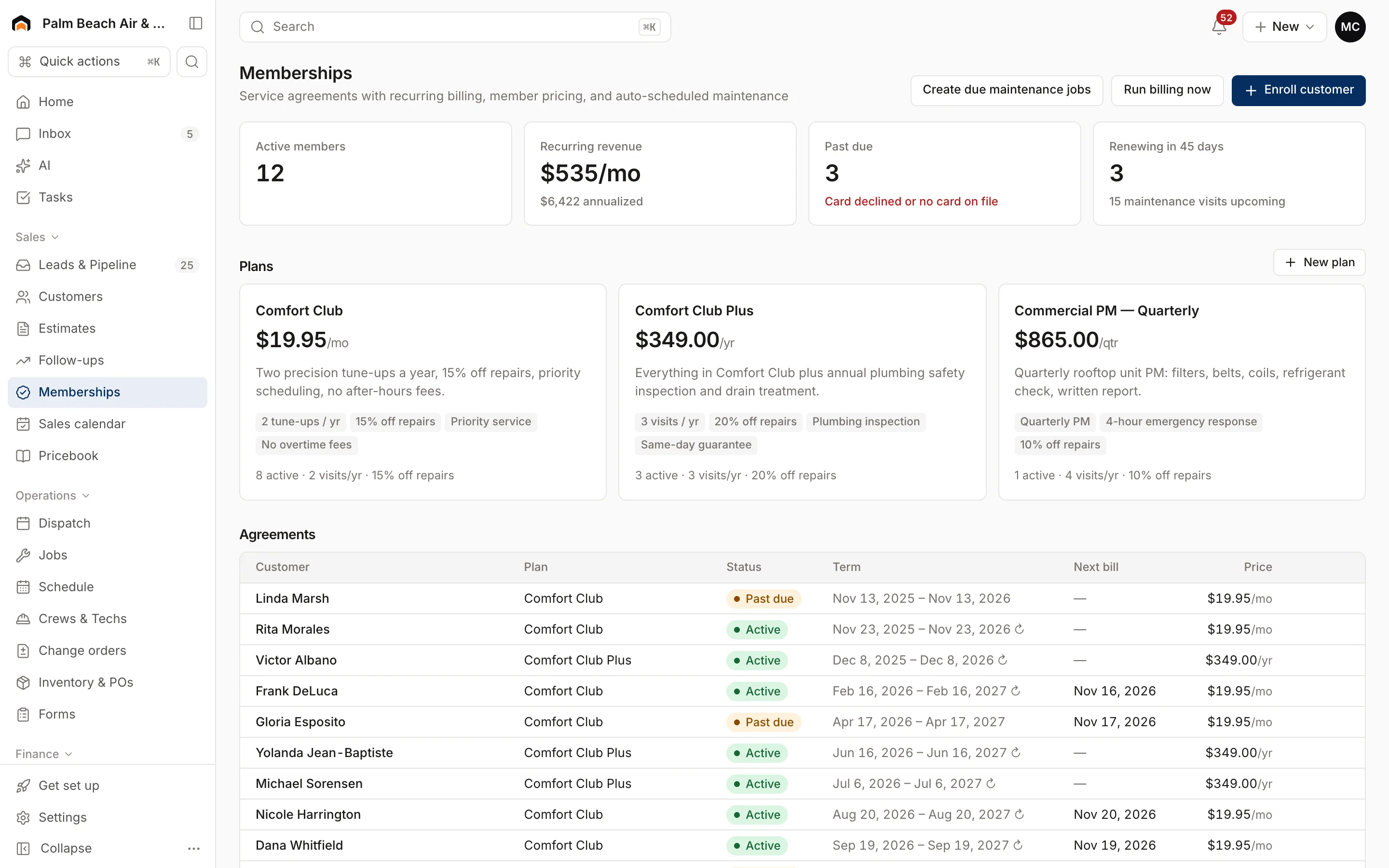
| Memberships | Membership plans on Pro and Scale: monthly, quarterly or annual billing, included visits, repair discount. | Recurring service plans are included on Max.[1] |
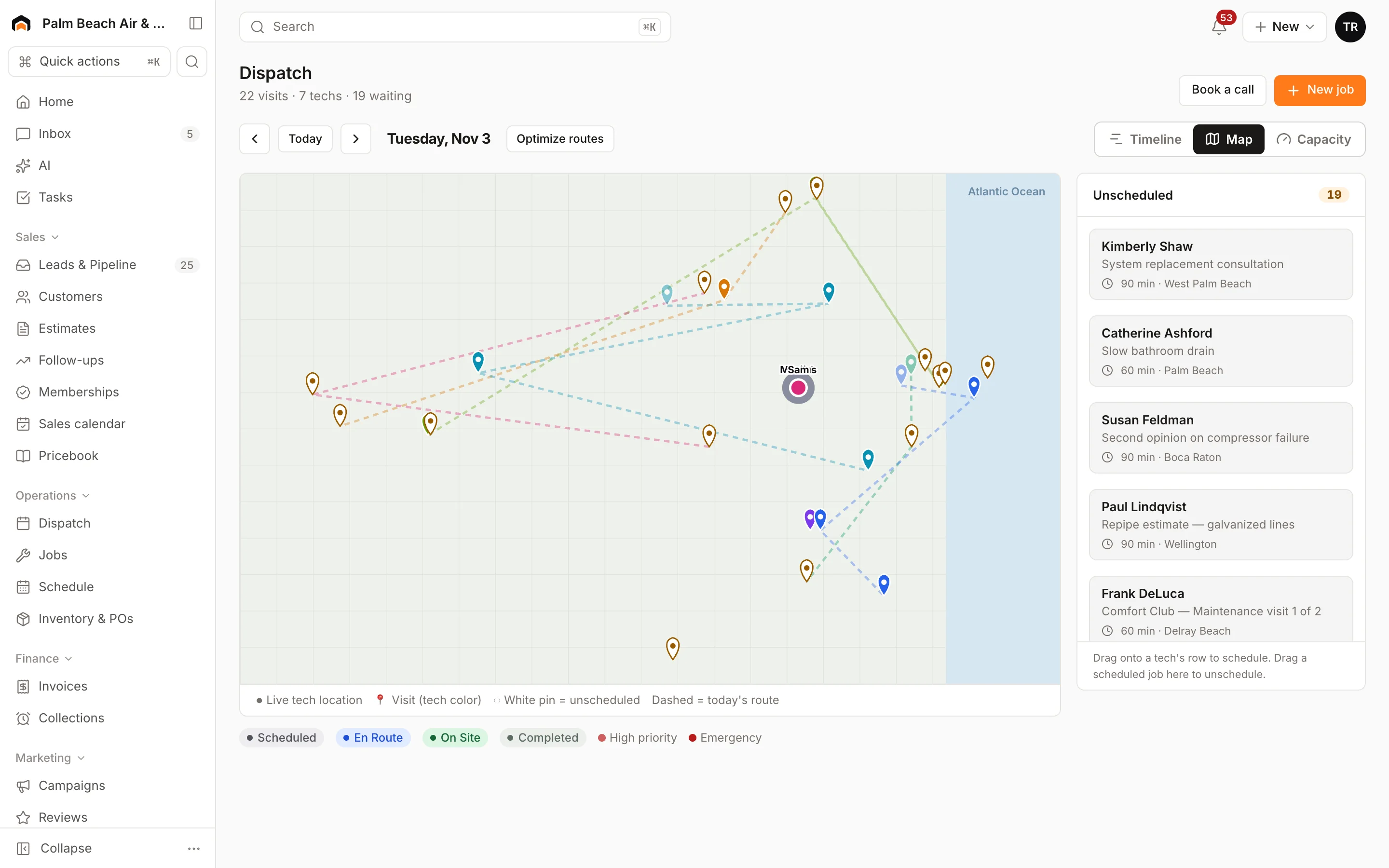
| Dispatch and routing | Dispatch board with timeline, map and capacity views; Optimize routes on Pro; AI Suggest ranks techs for a visit. | Scheduling and dispatch on every plan; routes and employee GPS from Essentials; route optimization on Max.[1] |
| Mobile and offline | Visits, checklists, photos, signatures, estimates and invoices work offline and sync when you reconnect; card payments need signal. | Free iOS and Android app in English and Spanish; the pricing page lists "offline viewing."[1] |
| Payments | Stripe built in; card reader at 2.7% + 5¢; deposits, pay links and consumer-financing prequalification. | Card processing from 2.59%, 1% bank payments, consumer and business financing on every plan; Tap to Pay listed as an add-on.[1] |
| Integrations | Available now: Quo (OpenPhone), Google Calendar, website forms and chat, webhooks and a public API. QuickBooks Online and Zapier are coming soon. | QuickBooks Online sync from Essentials; open API on Max.[1] |
| Reporting | Revenue collected, invoiced, average ticket, close rate, team performance and lead-source ROI. | Analyst AI builds custom reports from your business data; job costing on every plan.[1],[2] |
| AI | AI estimate and follow-up drafts, dictation, dispatch suggestions, Copilot and Coach. The AI receptionist runs in an in-app simulator and doesn't answer real calls yet. | AI Team included free; CSR AI answers calls 24/7 as an optional add-on (price not published).[2],[3] |
Fit
Where Homeforce fits better
Memberships and options without the top tier
Homeforce Pro ($299/mo, up to 10 techs) includes membership plans, good/better/best estimates, call tracking and route optimization. On Housecall Pro, recurring service plans, route optimization and the sales proposal tool are listed on Max.
A growing office doesn't change your plan
Homeforce counts field techs only, so adding a CSR or dispatcher doesn't move you up a tier. Housecall Pro's tiers are capped at 1, 5 and 8 users.
Service and project work in one place
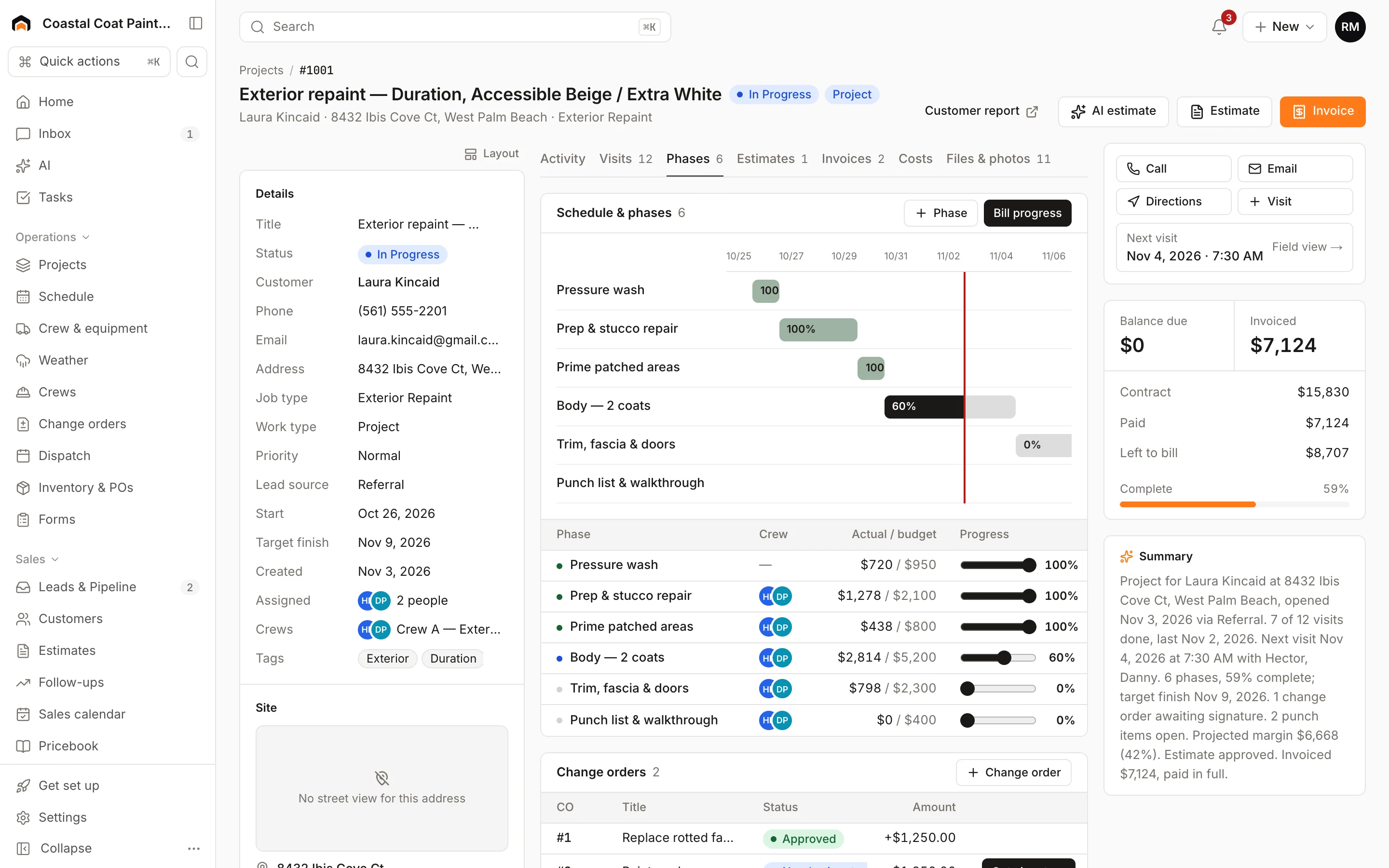
If you take on remodels, installs or other multi-week work, Homeforce Scale adds phases on a Gantt view, change orders, progress billing and a costs tab with budget vs actual, rolled into the same reports as your service calls.
Techs who work in dead zones
The Homeforce app keeps visits from yesterday through the next six days on the phone. Completing visits, checklists, photos, signatures, estimates and invoices all work with no signal and sync when the phone reconnects.
Who should stay with Housecall Pro
Stay with Housecall Pro if you need AI answering live calls today (CSR AI does; Homeforce's receptionist is still simulator-only), if QuickBooks Online sync is part of your daily bookkeeping, or if your team relies on the Spanish-language app. Its live phone and chat support on every plan, built-in financing and wide set of add-ons like payroll and websites are mature. A one-person business also pays less on Basic ($79/mo) than on Homeforce Starter ($99/mo).
What Homeforce looks like
Real screens from the Homeforce app, from our demo HVAC and painting companies.
Switching from Housecall Pro
Homeforce's importer detects Housecall Pro CSV exports. Bring in customers first, then contacts, properties, equipment, estimates, jobs and invoices; map each column and check the preview before importing. Price book items go in through the pricebook CSV import, which supports a member price column. If you sell service plans on Max, recreate each plan in Homeforce Memberships and enroll customers, since agreements are set up in the app rather than imported.
FAQ
Homeforce vs Housecall Pro: common questions
Have a question we didn't cover? Book a demo and ask a product specialist.
Does Homeforce have something like Housecall Pro's CSR AI?
Homeforce has an AI receptionist that qualifies callers and books real jobs into open time, but right now it only runs in an in-app simulator. It doesn't answer your phone line or website chat yet, so if live AI call answering is a must today, Housecall Pro's CSR AI add-on does that.
Which plan do I need for memberships on each platform?
On Homeforce, membership plans come with Pro ($299/mo) and Scale. On Housecall Pro, recurring service plans are included on Max ($329/mo billed monthly as of November 2026).
How do user limits compare?
Housecall Pro caps users at 1, 5 and 8 by tier, with $35/mo per extra user on Max. Homeforce limits field techs (3, 10 and 30) and doesn't charge for office users.
Can I take card payments offline in Homeforce?
No. Card payments need a connection. Offline, techs can record cash and check payments and send the invoice, which goes out when the phone reconnects.
Does Homeforce support financing like Housecall Pro?
Yes. Options of $500 or more show an estimated monthly payment, and you can prequalify the customer with a soft credit check from the estimate.
How long does switching from Housecall Pro take?
The data side is CSV-based: export from Housecall Pro, then import customers, history and your price book in Homeforce with a preview at each step. Homeforce is in early access, so you'll join a waitlist first and get a 14-day trial when your account is brought on.
Sources
Competitor details come from each company's public website and listings on the dates shown. Products change; check the vendor's site for current details. Spot something out of date? Email hello@tryhomeforce.com.
- [1] Housecall Pro pricing page · checked November 3, 2026
- [2] Housecall Pro Help Center: AI Team · checked November 3, 2026
- [3] Housecall Pro Help Center: CSR AI overview · checked November 3, 2026
- [4] Jobber pricing page · checked November 3, 2026
- [5] ServiceTitan pricing page · checked November 3, 2026
- [6] Workiz pricing page · checked November 3, 2026
- [7] FieldEdge pricing page · checked November 3, 2026
Keep exploring
Features compared
Industries
More comparisons
Run your whole business on Homeforce.
We're onboarding early customers a few at a time. Join the waitlist, or see it with your own jobs, techs, and pricebook in a 30-minute demo.
Onboarding early customers · Month-to-month · Free data migration