
Mold remediation software
Mold remediation software that keeps every job on protocol and on paper.
Scope each job to the assessor's protocol, run containment, removal, cleaning, and clearance as phases, keep air scrubbers and dehumidifiers booked, and hand the homeowner a progress report with photos of every step.
We're onboarding early customers — join the waitlist or book a demo.
Why Homeforce
Built around how mold remediation businesses actually work.
The problems mold remediation owners run into most — and how Homeforce handles each one.
- 01
Problem: The protocol says one thing, the estimate says another, and the crew works from memory.
With Homeforce: Attach the protocol to the job, write the scope as phases that follow it, and give the crew a checklist built from it.
- 02
Problem: Containment, negative air, and HEPA cleaning happen, but nothing proves it.
With Homeforce: Required checklist items and before, during, and after photos tagged by phase make the record as the work is done.
- 03
Problem: Air scrubbers sit on finished jobs while the next containment waits.
With Homeforce: Book air scrubbers and dehumidifiers on the crew board like crews, so a unit can't be on two jobs at once.
- 04
Problem: The job drags on waiting for clearance and the final invoice waits with it.
With Homeforce: Bill the deposit at approval and progress invoices as phases finish, with clearance as its own phase on the schedule.
How it works
A day in a mold remediation business, on Homeforce.
From the assessor's report to post-remediation clearance and rebuild, every mold job runs as a documented project.
Protocol to estimate
Write the scope the protocol asks for.
Record the assessor's protocol in a file field on the job, then build the estimate in phases that match it: containment and negative air, removal of affected materials, HEPA vacuuming and cleaning, and the clearance hold. Take a deposit when the homeowner approves.
Project schedule
Containment to clearance on one timeline.
Each job is a project with phases and budgets. The crew lead sees which phase is active, and the office sees whether the job is waiting on removal, cleaning, or the assessor's clearance visit before rebuild can start.
Job record
What happened in the containment, every day.
The crew lead logs work performed, crew size, and hours each day, with issues and delays kept internal. Photos go on the project's timeline under the phase they belong to, and the homeowner gets a progress report link that shows the work, not the internal notes.
Containment & PPE
The steps that matter can't be skipped.
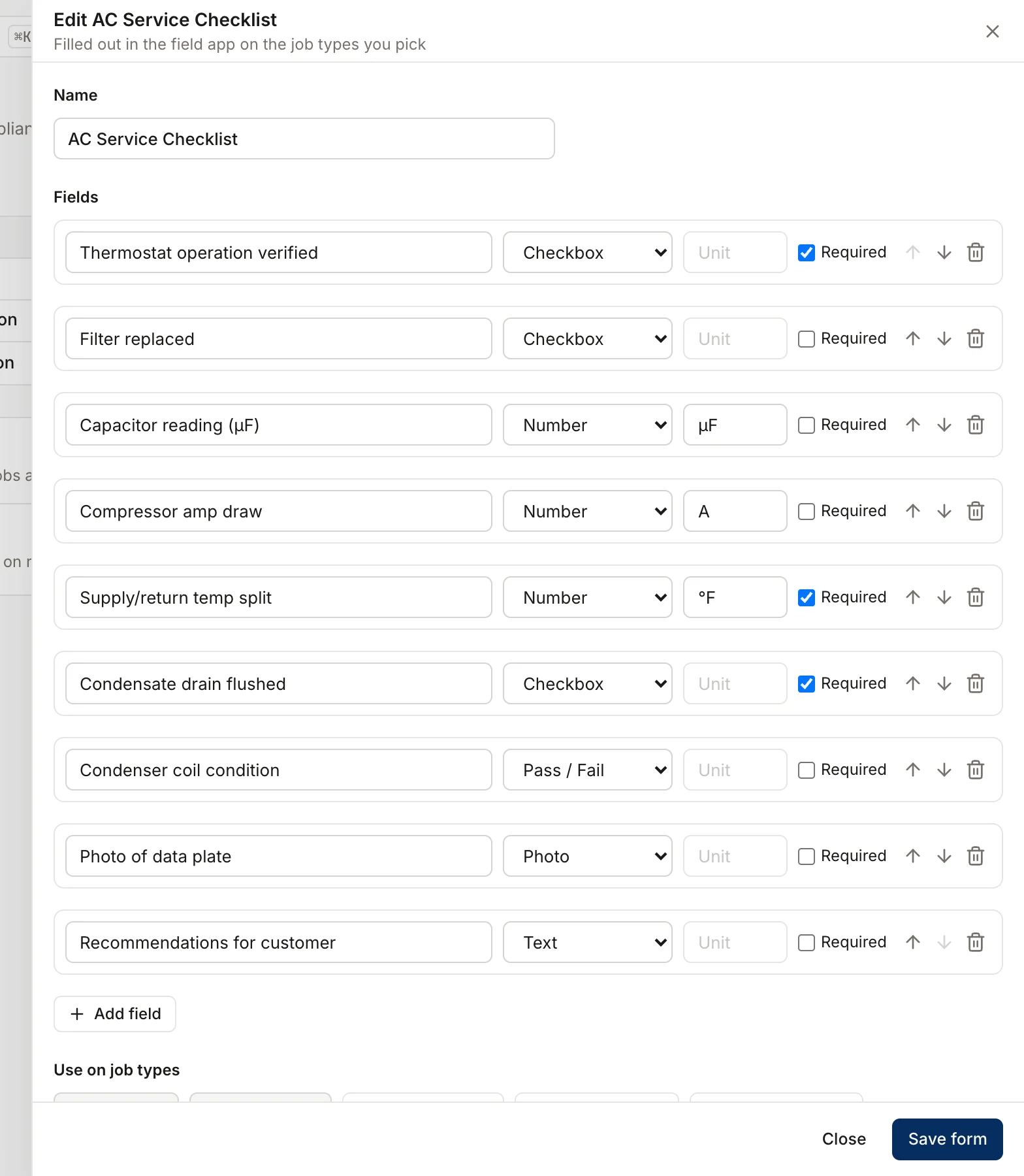
Build a containment checklist with required items for poly and seams, negative air, HEPA equipment, and PPE, plus number items for readings you take. The checklist can't be marked complete until every required item is filled in.
Crew board
Know which air scrubber is in which basement.
Add each air scrubber, dehumidifier, and HEPA vacuum as equipment and book it with the crew. When a job stretches, the unit stays booked; when it comes back for filter service, block it out.
Built for mold remediation
The features mold remediation teams use most.
- Projects & job costingMulti-week jobs scheduled, tracked, and costed live.Learn more
- Forms & checklistsConsistent inspections, photos, and sign-offs on every job.Learn more
- Change orders & progress billingApproved scope changes and milestone billing, in order.Learn more
- Estimates & proposalsGood / better / best options, signed on the spot.Learn more
- Customer portalSelf-serve approvals, payments, and history for customers.Learn more
- Mobile appEverything techs need in the field — even offline.Learn more
- Dispatch & schedulingOne drag-and-drop board for every tech and job.Learn more
- Sales pipelineTrack every open estimate and lead until it closes.Learn more
Inside the containment
The crew lead's phone is the job file.
Crew leads open the day's visit, clock in, work the containment and cleaning checklists, and take before, during, and after photos tagged by phase. The office writes change orders when hidden growth turns up, and the homeowner signs on the tablet.
- Photos grouped by phase on the project's photo timeline
- Checklists with required items and number readings
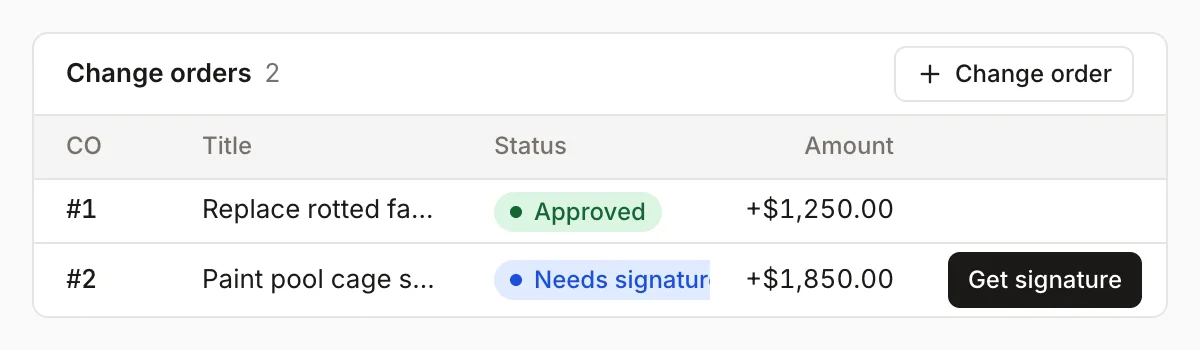
- Hidden growth priced as a change order before work continues
Homeforce for mold remediation, on real screens
Screens from the Homeforce app, taken from our demo companies.

FAQ
Mold remediation software questions, answered.
Have a question we didn't cover? Book a demo and ask a product specialist.
Can Homeforce follow a third-party assessor's protocol?
Yes. Keep the protocol in a file custom field on the job, build the estimate and phases to match it, and turn the protocol's steps into a checklist for the crew. Homeforce doesn't write protocols or decide clearance; that stays with your assessor.
Does it handle post-remediation clearance?
Make clearance its own phase so the schedule shows when the job is waiting on the assessor, and add the result to the daily log. Some states, such as New York and Texas, require the assessor and remediator on a project to be independent of each other, so clearance testing is often billed by the assessor.
What happens when we find more growth after opening the wall?
Write a change order on the project with the price, your cost, and any extra days, and have the homeowner sign it on your screen. Once signed, it's added to the contract and the next progress invoice bills against the new total.
Can we track air scrubbers and dehumidifiers?
Yes. Add them as equipment on the crew board and book them with crews. Equipment can't be double-booked, and you can block a unit out for filter changes or repairs.
Does it help with insurance-related mold jobs?
Add custom fields for the claim number and adjuster, print or email invoices for the adjuster, and use the Commercial pipeline on the leads board for property managers. Coverage decisions are between the homeowner and their insurer.
More for mold remediation businesses
Run your mold remediation business on Homeforce.
We're onboarding early customers a few at a time. Join the waitlist, or see it with your own jobs, techs, and pricebook in a 30-minute demo.
Onboarding early customers · Month-to-month · Free data migration