
Marketing
How to get more Google reviews for your contracting business
How to get more Google reviews as a contractor: find your review link, ask at the right moment, use proven text and email scripts, and follow FTC rules.
The Homeforce team · · 9 min read
The fastest way to get more Google reviews is boring: ask every customer, right after the job is done and paid for, with a direct link to your review form. Send it by text if you can. Most contractors don't have a review problem. They have an asking problem. The tech forgets, the office gets busy, and the happiest customers never get a link.
This guide covers why reviews move your local ranking, how to get your Google review link, when and how to ask (with scripts you can copy), how to reply, and the things you must not do under Google's policies and the FTC's 2024 rule on fake reviews. There's also a worked example so you can estimate how many reviews a month a real ask process should produce.
Why do Google reviews matter for a contractor?
Homeowners searching "plumber near me" or "roof repair" see the map pack first, and your star rating and review count sit right next to your name. Reviews also feed how Google ranks you.
Google says local results are based mainly on relevance, distance and prominence. Prominence is how well-known your business is, and Google says review count and rating are part of it: more reviews and positive ratings can help your local ranking. You can't change your distance from a searcher, and relevance mostly comes down to filling out your Business Profile properly. Reviews are the ranking lever you can keep pulling every week.
How do I get my Google review link?
Don't tell customers to "search for us on Google and leave a review." Every extra step loses people. Send a direct link instead.
Google's help doc on how to create a link or QR code to request reviews walks through it:
- On a computer (Google says the QR code can't be made on a phone), open business.google.com and go to your Business Profile.
- Click Read reviews, then the option to get more reviews.
- Click the copy icon to copy your review link, or right-click the QR code and save the image.
Save that link everywhere your team will need it: your phone's text replacements, your email signature, your invoice footer and your field software. Print the QR code on leave-behind cards and job-site signs.
Google also notes that customers need a Google Account to post a review, and they can create one with a non-Gmail address (Tips to get more Google reviews). Worth knowing when a customer says they "can't" leave one.
When should a contractor ask for a review?
Ask when the customer is happiest and the job is clearly over. For most home-service work that means one of two moments:
- Right after the job, in person. The tech walks the customer through the finished work, they say "this looks great," and the tech says a review would really help. Then the link arrives by text within the hour.
- Right after payment. Once the invoice is paid in full there's no open question about money, and the request doesn't feel like it's tied to the bill. This is the easiest moment to automate.
Avoid asking before the work is finished, while a callback is still open, or in the same message as a payment demand. And ask everyone, not just the customers you think loved you. More on why below.
Should you ask by text or email?
Text, if you have a phone system that can send it. Texts get read on the spot, and the customer can tap the link from the driveway. Email works as a backup and for commercial customers who live in their inbox. Many shops send a text, then an email a day or two later to anyone who didn't respond. If you're adding texting, make sure customers have agreed to hear from you and that opt-outs are respected.
Review request scripts you can copy
Keep it short, personal and specific. Use the customer's first name and mention the job.
Text, right after the job:
Text, after payment:
Email:
Notice what these don't say: nothing about stars, no "if you loved us," no offer of a discount. That's deliberate.
Worked example: how many reviews a month should you expect?
Your review count is just math: jobs completed, times the share of customers you actually ask, times the share who leave a review. Here's an illustrative example. The inputs are assumptions, not industry benchmarks, so plug in your own.
Assumptions:
- Jobs completed per month: 60
- Ask rate today (techs remember to ask on their own): 25%
- Ask rate with an automatic request after every paid invoice: 90% (some jobs are warranty work, commercial accounts or customers who opted out)
- Response rate (share of people asked who leave a review): 12%
Today:
60 jobs × 25% asked = 15 requests 15 requests × 12% = 1.8 reviews a month
With an automatic ask:
60 jobs × 90% asked = 54 requests 54 requests × 12% = 6.5 reviews a month
Same customers, same crew, same response rate, and roughly 3.6 times as many reviews. If you sit at 40 reviews today and want to pass 100:
- At 1.8 a month: 60 ÷ 1.8 ≈ 33 months
- At 6.5 a month: 60 ÷ 6.5 ≈ 9 months
The biggest lever is almost always ask rate, because it's the one you control completely. Response rate improves at the margins with better timing, a text instead of an email, and a one-tap link. Track both monthly so you know which one is slipping.
How should you reply to Google reviews?
Google's own guidance on managing reviews boils down to a few rules:
- Keep replies short, polite and specific. Skip the identical "Thanks for the review!" on every one. Mention the job or the tech when you can.
- Don't advertise in replies. Google says not to use review replies to push deals or promotions.
- Respond promptly and sign it with your name or initials.
- For negative reviews, don't share private details or get personal. Acknowledge real mistakes, explain what you can and can't do, and invite the person to call or email so you can sort it out offline.
- Flag reviews that break Google's policies rather than arguing with them in public.
Google's ranking help page also notes that positive reviews paired with helpful replies can make your business stand out (Tips to improve your local ranking on Google). A calm, fair reply to a one-star review often does more for the next prospect than ten five-stars.
What not to do: fake reviews, incentives and review gating
This is where contractors get into real trouble, and the rules are stricter than many people assume.
Don't pay for reviews or offer anything for them
Google's prohibited and restricted content policy bans reviews posted because of a business incentive, such as payment, discounts, or free goods or services. Google's review tips page says the same about offering free or discounted work in exchange for posting, changing or removing a review. So "10% off your next service for a review" is out on Google, even if the discount isn't tied to a five-star rating. Google removes reviews that break these rules.
Don't write, buy or fake reviews
The FTC's rule on consumer reviews and testimonials (16 CFR Part 465) took effect on October 21, 2024. According to the FTC's announcement, it prohibits:
- Fake reviews, including AI-written ones and reviews from people who never used your business.
- Offering compensation or incentives conditioned on a review being positive (or negative), whether stated outright or implied.
- Undisclosed insider reviews, such as from employees or managers, and certain reviews they solicit from relatives.
- Suppressing negative reviews through groundless legal threats, intimidation or false accusations.
The rule lets the FTC seek civil penalties against businesses that knowingly break it. That means no reviews from your spouse, your crew or your cousin posing as a customer.
Don't gate reviews
"Review gating" means asking customers how they'd rate you first, then sending only the happy ones to Google and routing everyone else to a private feedback form. Google's policy says businesses may not selectively solicit positive reviews or discourage negative ones (Prohibited and restricted content). The FTC's Q&A on the rule adds that asking only customers you expect to be happy isn't specifically banned by the rule but could still violate the FTC Act.
The safe approach: send the same request to every customer, and don't ask for a specific rating or specific wording. Google's policy also says not to pressure customers to post while you're standing there. Asking is fine. Hovering is not.
Doing this in Homeforce
Homeforce can send the ask for you at the moment that matters. In Settings → Reviews, turn on Ask for a review automatically, paste your Google review link, and choose Text, Email or Text and email. Homeforce then sends the request once the customer's invoice is paid in full, to every customer, so nobody gets skipped because a tech forgot. You can edit the wording under Automated messages. See Reviews settings for the steps.
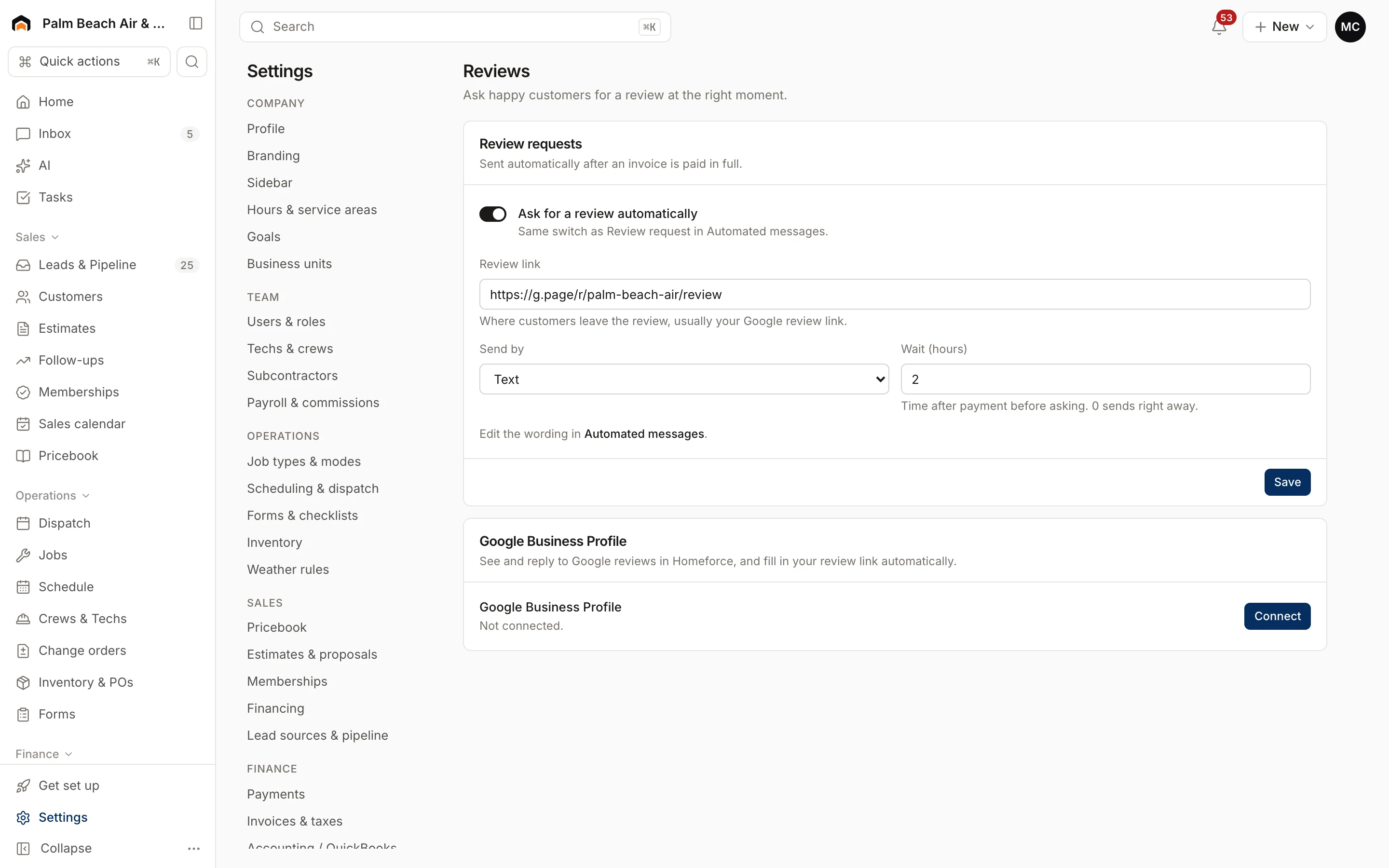
Text requests go through a connected phone system, so set up phone and texting first. You can also set a Reviews per month target in Goals and check your month-to-date number against it, which makes the worked example above something you can actually track. More on the reviews feature and two-way texting.
FAQ
How do I get more Google reviews fast?
Send a direct review link to every customer right after the job is finished or paid for, ideally by text. Raising the share of customers you ask is usually the biggest lever. Automating the ask removes the "tech forgot" problem.
Can I offer a discount for a Google review?
No. Google's policies ban reviews posted because of an incentive like payment, discounts or free services, and those reviews get removed. Under the FTC's rule, incentives conditioned on a positive review are also illegal.
Is it OK to only ask happy customers for reviews?
No. Google says businesses may not selectively solicit positive reviews, and the FTC says the practice could violate the FTC Act. Send the same request to every customer.
Should I reply to every Google review?
Reply to as many as you reasonably can, and especially to negative reviews. Keep replies short, specific and polite, and don't use them to advertise. Google says positive reviews plus helpful replies can help your business stand out.
Can my employees leave reviews for my business?
Not as if they were ordinary customers. The FTC rule requires insider reviews to clearly disclose the connection to the business, and Google treats reviews that aren't based on a real customer experience as fake engagement.
Sources
- Tips to improve your local ranking on Google, Google Business Profile Help. Accessed 2026-11-03.
- Create a Google link or QR code to request reviews, Google Business Profile Help. Accessed 2026-11-03.
- Tips to get more Google reviews, Google Business Profile Help. Accessed 2026-11-03.
- Tips to get more reviews, Google Business Profile Help. Accessed 2026-11-03.
- Prohibited and restricted content, Google Maps User Generated Content Policy Help. Accessed 2026-11-03.
- Federal Trade Commission Announces Final Rule Banning Fake Reviews and Testimonials, Federal Trade Commission. Accessed 2026-11-03.
- Consumer Reviews and Testimonials Rule: Questions and Answers, Federal Trade Commission. Accessed 2026-11-03.